
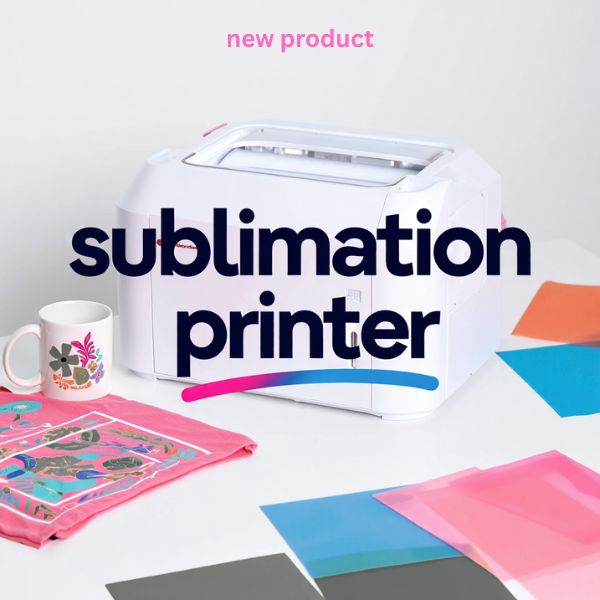
Epson Dye-Sublimation F170 Printer with PrecisionCore Technology, Includes Full Set of Sublimation Ink, User Guide & AC Power Cable SCF170
408.99৳
Description
The Epson SureColor F170 is a compact dye-sublimation printer built for creating custom apparel, drinkware, awards, and more. It features a built-in PrecisionCore® printhead that applies ultra-fine droplets to produce sharp text and rich images. Unlike a converted EcoTank, the F170 comes ready-made for sublimation: Epson includes a full set of its genuine sublimation ink bottles (140 mL each), a user guide, and an AC power cable. Simply connect the F170 to your computer (or network), load Epson transfer paper, and you’re set. Its professional-grade output means even intricate designs and logos appear with bright, accurate colors and deep blacks. This all-in-one printer is designed to be “truly turnkey,” giving hobbyists and small businesses a stress-free dye-sub solution straight out of the box.
The F170’s Precision Droplet Control printhead ensures image clarity and detail. It supports both rigid and soft media transfers, so you can personalize not only T-shirts and fabric items but also hard goods like mugs, mousepads, and aluminum panels. According to Epson’s own description, it delivers “professional-quality prints using powerful PrecisionCore® technology” and is ideal for personalizing awards, tumblers, mugs, mousepads and more. In short, the SureColor F170 puts full dye-sublimation printing power on your desktop, with Epson’s famous reliability and quality.
Benefits of Using This Product
Using the Epson SureColor F170 streamlines your sublimation projects from start to finish. As shown above, it produces vivid, photo-quality transfers for both garments and hard items. Key benefits include:
- Plug-and-Play Convenience: No DIY hacking or special conversion is needed. The F170 is a true sublimation printer that’s ready to go after you fill it with ink. Just unbox, fill the four color inks (pre-packaged for easy, spill-free refilling), and start printing. Its clear LCD panel and Epson software make setup straightforward even if you’re new to sublimation.
- Professional-Quality Output: Thanks to its PrecisionCore printhead and high resolution, the printer delivers vibrant, long-lasting images. Colors pop on the transfer sheets, and once pressed, designs have that crisp, commercial-grade look. Reviewers note that the F170’s colors are “bright and vibrant” with superb saturation, rivaling more expensive wide-format machines.
- Lower Running Costs: Each included 140mL ink bottle contains almost four times the ink of typical competitor cartridges. Plus, Epson’s sublimation ink is comparatively inexpensive. This means you can print thousands of transfers before needing new ink. Over time, lower ink costs and fewer refills significantly reduce your per-print expense compared to cartridge-based sub printers.
- Epson Support and Warranty: Because the F170 is an official Epson product, it’s backed by full manufacturer warranty and support. This warranty even covers ink-related issues, which is rare among sublimation printers. If you have any trouble, Epson’s tech support (toll-free number included) will assist — something you won’t get with a converted printer or generic brand.
- Versatile Personalization: From custom T-shirts and tote bags (polyester fabrics) to ceramic mugs and coated mousepads, the F170 lets you produce a wide variety of personalized gifts and products. Epson’s own documentation notes it’s perfect for textiles, awards, mugs, and more. The printer’s driver even includes presets for both rigid and soft substrates, making it easier to select the right settings for every project.
These benefits make the SureColor F170 an outstanding choice if you want high-quality sublimation printing with minimal hassle and overhead.
Specifications
- Printing Technology: Epson PrecisionCore® microTFP® printhead.
- Max Resolution: 1200 × 600 dpi; 784 total nozzles (400 Black, 128 each Cyan/Magenta/Yellow).
- Ink Type: Epson T49M dye-sublimation ink bottles (CMYK); each bottle is 140 mL.
- Media Handling: Sheets 3.5″–8.5″ wide (up to 47.2″ long). 150-sheet front-loading tray (Epson DS Multi-Use sublimation paper).
- Connectivity: Hi-Speed USB 2.0; Ethernet 10/100 Mbps; Wireless 802.11 b/g/n; Wi-Fi Direct.
- Supported OS: Windows 10/8/7 (32/64-bit); Mac OS X 10.6–10.15.
- Control Panel: 2.4″ color LCD with physical buttons. No touchscreen (setup via LCD and buttons).
- Dimensions: Approx. 14.8″ W × 19.8″ D × 7.4″ H; Weight ~10.2 lb.
- Power: 100–240V AC, 50–60 Hz; Power Consumption ~13W (printing), 4.1W (ready), 0.7W (sleep).
- Warranty: 1-year limited (printer exchange) plus Epson tech support.
How to Use / Installation
Setting up the Epson F170 is straightforward. First, fill the ink tanks (before power-up). Lift the top cover, open each color-coded ink port lid, and insert the matching Epson ink bottle – the bottles snap in place with no mess. (If you use third-party ink, you’d pour it from a bottle or syringe; but Epson’s keyed bottles simply click in.) Then plug in and power on the printer. Follow the on-screen prompts to load paper, align the print head, and connect to your PC or network. For best results, install the latest Epson printer software or driver on your computer and select the correct media type (e.g. “textile transfer” or “sublimation paper”).
Once setup is complete, load the sublimation transfer paper into the tray and print your design from your computer. The F170 will print the image in mirrored form onto the paper. After printing, use a heat press (not included) to transfer the design to your chosen item (fabric, mug, etc.). The included user guide provides step-by-step instructions and recommended settings. In short, there are just a few key steps: fill the inks, connect to power/PC, load paper, and print – making it easy even for first-time users.
Why Choose This Product
- Genuine Sublimation Support: Because the F170 is built by Epson for sublimation, you get a hassle-free experience and full warranty coverage. There’s no tricky ink mixing or voiding of warranty – Epson supports this printer’s use with sublimation ink.
- Best Value: The combination of included 140mL inks and competitive pricing makes the F170 one of the most cost-effective sublimation printers available. Each ink set yields far more prints than typical cartridges, lowering your cost per item.
- Plug-and-Play Simplicity: If you’re new to sublimation, the F170 is designed to get you printing fast. Reviewers praise its “easy setup” and straightforward operation. The printer comes with a printed guide, sample papers, and full software support to guide beginners through each step.
- Professional Output: With the same print engine found in high-end Epson models, the F170 produces crisp, vibrant prints on par with larger commercial sublimation setups. It also offers features like auto-stop ink bottles and a dust-resistant tray to ensure reliable, high-quality results day after day.
- Compact Workspace Footprint: Its small size makes the F170 ideal for home studios or small shops. Epson notes its “remarkably compact, space-saving design”, and reviewers confirm it fits easily on a desk. This leaves more room for your heat press or other equipment.
- Versatile Personalization: Whether you want to start a small custom gifts business or craft personal projects, the F170 delivers. It’s specifically intended for hobbyists, crafters, and small business owners. You can trust it for hobby or production – creating everything from custom mugs to sports awards – with Epson’s proven reliability.
FAQs
Q: What’s included with the Epson SureColor F170 sublimation printer?
A: The F170 package is comprehensive. It includes the printer itself, four 140mL Epson sublimation ink bottles (CMYK), a user guide, and the AC power cable. (Some retailers may bundle extra items like transfer paper, but the OEM kit always has the inks, manual and cable.)
Q: Is the Epson F170 a true sublimation printer?
A: Yes. Unlike a converted EcoTank, the F170 is a dedicated dye-sublimation printer straight from Epson. This “true sublimation printer” requires no modification – just add ink and it’s ready to print transfers. Because it’s official Epson hardware, your warranty remains intact even while using sublimation inks.
Q: What print quality and resolution does the F170 deliver?
A: The SureColor F170 prints at up to 1200×600 dpi using 4-color (CMYK) ink. This yields very detailed, smooth prints. Owners report that colors come out “bright and vibrant” and fine lines and gradients reproduce well. In practice, the output rivals mid-range sublimation printers but at a lower cost.
Q: Is the Epson F170 suitable for beginners?
A: Absolutely. It’s designed for ease of use. The F170 is praised as “great for both beginner and experienced sublimators”. It has a step-by-step setup process and simple ink refilling (color-coded, spill-free bottles). There’s no tricky firmware to install or risky hacks to perform – you simply follow the quick-start guide and start printing. Many small business owners and hobbyists favor it for its ease-of-use and professional output.
Q: What types of projects can I do with this sublimation printer?
A: You can personalize a wide variety of items. The included inks are OEKO-TEX® certified, meaning they’re safe for use on textiles, apparel, and household goods. Typical projects include custom T-shirts, polyester bags, ceramic mugs, water bottles, awards plaques, mousepads, and more. Basically, any sublimation-ready surface (mostly polyester fabrics or specially coated hard goods) can be decorated using transfers printed on the F170.
Final Verdict
The Epson SureColor F170 is a standout sublimation printer for anyone serious about custom printing. It combines Epson’s renowned PrecisionCore print technology with an all-inclusive package, so you get professional-quality output without headaches. Users and reviewers consistently note its vibrant, sharp prints and its convenience for small-batch projects. With its space-saving design and low running costs, it’s ideal for hobbyists, crafters, or small businesses that want reliable performance. In summary, the F170 delivers a complete dye-sub solution right from the start – a compelling choice if you need a desktop sublimation printer that “just works” and produces eye-catching results every time.
Related products
-

Cheetah Print Leopard Print in a GLOSSY Finish, 8.5″x11″, 150 Pages: Super Cute Leopard Print or Cheetah Print Notebook Journal Diary
6.49৳ -
X-ACTO #1 Z-Series Precision Utility xacto knife – Metal Silver Aluminum Handle with Safety Cap for Clean, Controlled & Detailed Cutting
5.00৳ -
Hardy Gallery Animals Artwork Wildlife Picture Painting: Horse Head Graphic Art Print Wall Art for Wall Decor (24″ x 18″)
41.99৳
Reviews
There are no reviews yet.